Planetary Flow: víry a prúdenie atmosféry na GPUPlanetary Flow: atmospheric flow and vortices on the GPU
Do aplikácie Fractal Explorer pribúda Planetary Flow: interaktívna simulácia prúdenia na celej planéte. Môžete sledovať pásy atmosféry, ich zvlnenie a víry, ktoré sa počas vývoja objavujú a menia. Výpočet prúdenia aj vykresľovanie bežia na grafickej karte priamo v prehliadači.
Fractal Explorer gains Planetary Flow, an interactive fluid simulation covering an entire planet. Watch atmospheric bands bend and vortices emerge and evolve over time. Both the fluid calculation and rendering run on the GPU directly in your browser.
Otvoriť Fractal Explorer V ponuke Fractal Type vyberte Planetary Flow. Ďalej v článku nájdete vysvetlenie ovládania aj predvolených hodnôt.
Open Fractal Explorer Select Planetary Flow under Fractal Type. The guide below explains the controls and default values.

Od fraktálov k atmosfére, ktorá sa vyvíjaFrom fractals to an evolving atmosphere
Pri fraktáloch skúmame matematický vzor a jeho detaily pri priblížení. Planetary Flow pridáva ďalší rozmer: históriu vývoja. To, čo vidíte, závisí od počiatočného stavu, nastavení aj od času, ktorý simulácia už prepočítala. Rovnaké posuvníky preto bez rovnakého počiatočného stavu a času nemusia dať rovnaký obrázok.
Fractals let us explore a mathematical pattern and its detail at different scales. Planetary Flow adds another dimension: the history of the flow. What you see depends on the initial state, the controls and how much simulated time has elapsed. Matching slider values alone will not necessarily reproduce an image without the same starting state and elapsed time.
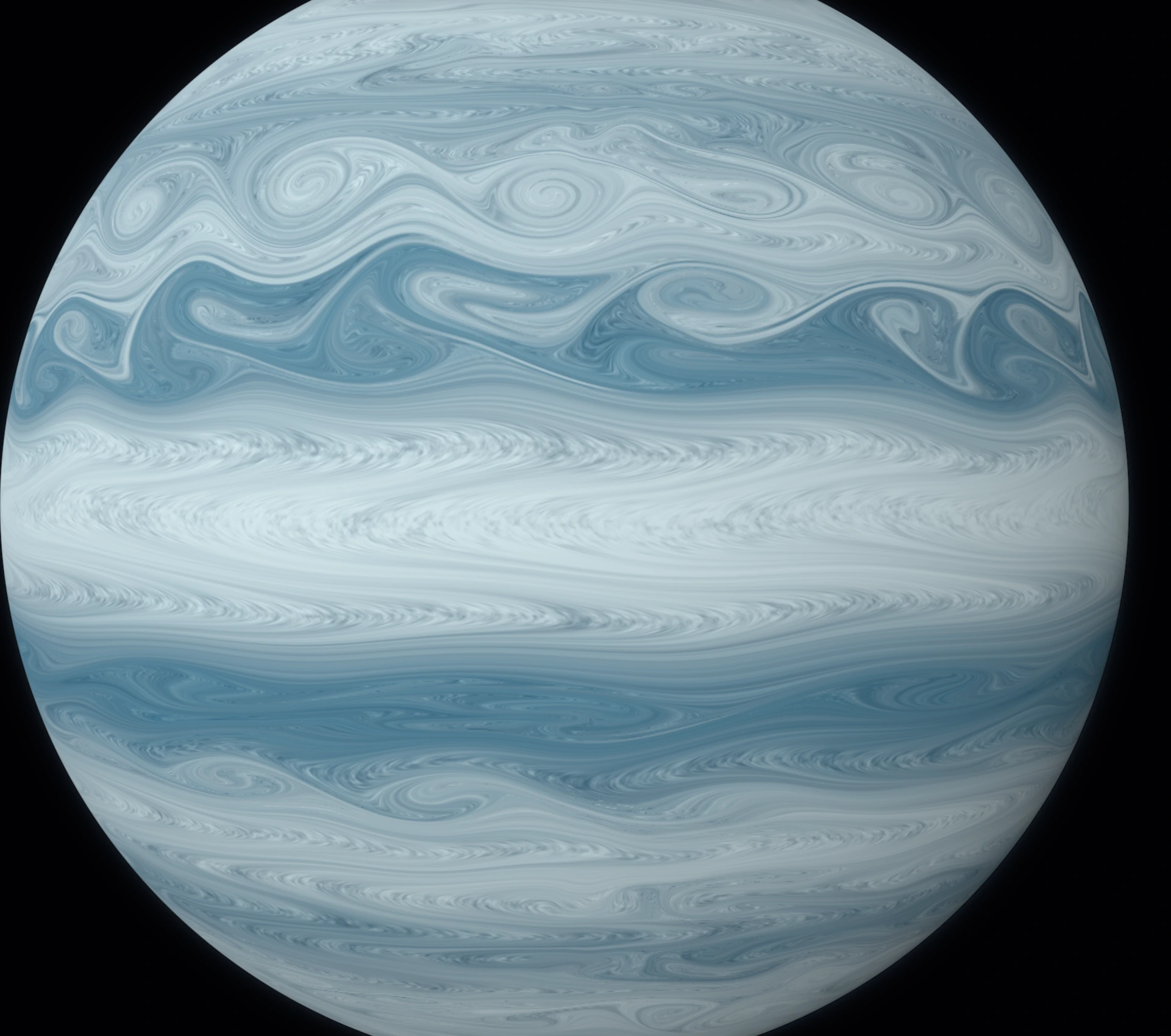
Susedné pásy sa pohybujú rozdielnymi rýchlosťami. Ich rozhrania sa môžu zvlniť a stáčať do väčších štruktúr. Nevznikajú pri každom spustení v rovnakom okamihu. Výsledok ovplyvňuje aj rozlíšenie výpočtovej siete: menšie víry potrebujú jemnejšie rozlíšenie. Užitočné je nechať pohľad sledovať rotujúcu planétu, aby pohyb oblakov nezanikol v otáčaní celého telesa.
Adjacent bands move at different speeds. Their boundaries can develop waves and roll into larger structures, with no fixed moment at which a vortex must appear. Grid resolution also affects the result: smaller eddies need finer resolution. Tracking the rotating planet helps reveal cloud motion without the body rotation dominating the view.
Čo sa počíta pod povrchomWhat the model computes
Základom sú rovnice plytkej vody na rotujúcej sfére, používané tu ako zjednodušený model jednej atmosférickej vrstvy. Simulácia vyvíja výšku vrstvy a jej vodorovnú hybnosť. Zahŕňa tlakové sily, Coriolisov účinok a viskózne miešanie. Farebný materiál je unášaný vypočítaným vetrom, takže aj hnedé a svetlé pásy sa pohybujú spolu s prúdením.
The simulation uses the rotating shallow-water equations on a sphere as a simplified model of one atmospheric layer. It evolves layer depth and horizontal momentum, including pressure forces, the Coriolis effect and viscous mixing. Colored material is transported by the computed wind, so both dark and light bands move with the flow.
Počiatočný profil vetra vychádza zo spracovaných meraní pohybu oblakov sondou Cassini. Pozorovania pokrývajú približne pásmo medzi 50° južnej a 50° severnej šírky; pokračovanie smerom k pólom je modelový predpoklad. Farebné palety slúžia na zobrazenie materiálu. Model nerieši chémiu oblakov ani úplnú trojrozmernú atmosféru a nie je predpoveďou počasia na Jupiteri.
The initial wind profile comes from processed Cassini cloud-tracking measurements, covering roughly 50° south to 50° north. Extending that profile towards the poles is a modeling assumption. The palettes visualize transported material. The model does not resolve cloud chemistry or a full three-dimensional atmosphere, and it is not a Jupiter weather forecast.
Zdroj profilu: Young, Read, Armstrong a Lancaster (2017), Jupiter horizontal wind velocities at cloud level from Cassini, licencia ODC-BY 1.0. Skutočný pohyb Jupiterových oblakov si môžete porovnať s animáciou NASA: Planetwide Color Movie. Obrázky v tomto článku sú zábery našej simulácie.
Wind data: Young, Read, Armstrong and Lancaster (2017), Jupiter horizontal wind velocities at cloud level from Cassini, under ODC-BY 1.0. Compare real Jovian cloud motion with NASA’s Planetwide Color Movie. The images in this article are captures of our simulation.
Rýchlosť vývoja a fyzika prúdeniaPlayback speed and flow physics
| NastavenieControl | Čo robíWhat it does |
|---|---|
| Weather speed | Riadi, koľko modelového času má uplynúť za reálnu sekundu. Hodnota 1× požaduje 3 simulované hodiny za sekundu; predvolené 1,4× požaduje 4,2 hodiny. Nemení násobok vetra. Ak GPU nestíha, stavový riadok ukáže oneskorenie GPU behind. Controls the requested simulated time per real second. At 1× the target is 3 simulated hours per second; the default 1.4× requests 4.2 hours. It does not multiply the wind. If the GPU cannot keep up, the status line reports GPU behind. |
| Wind multiplier | Násobí počiatočný profil vetra. Predvolené je 1,15×; 1× zodpovedá použitému spracovanému profilu. Vyššia hodnota mení aj rozdiely rýchlostí medzi pásmi. Po dokončení zmeny sa atmosféra znovu inicializuje. Scales the initial wind profile. The default is 1.15×; 1× uses the processed reference profile. A larger value also changes speed differences between bands. Completing a change reinitializes the atmosphere. |
| Rotation period | Doba jednej rotácie v hodinách, predvolene 9,925 h. Kratšia perióda znamená rýchlejšiu rotáciu a pri zapnutej Coriolisovej sile silnejší rotačný účinok. Zmena obnoví počiatočný stav. The rotation period in hours, default 9.925 h. A shorter period means faster rotation and a stronger rotational effect when Coriolis is enabled. Changing it rebuilds the initial state. |
| Coriolis force | Zapína účinok rotujúcej sústavy na smer prúdenia; jeho charakter závisí od zemepisnej šírky. Predvolene je zapnutý. Vypnutie je porovnávací experiment a zmena resetuje atmosféru. Enables the effect of the rotating reference frame on flow direction, which varies with latitude. Enabled by default. Disabling it is a comparison experiment; toggling it resets the atmosphere. |
| Rotating-geoid balance included | Informačná, uzamknutá voľba. Účinok odstredivej sily je zahrnutý do referenčnej efektívnej gravitácie a geoidu. Nie je to ďalší nastaviteľný ťah smerom k rovníku. A locked informational control. Centrifugal effects are included in the reference effective gravity and geoid. It is not an additional adjustable pull towards the equator. |
| Maintain measured jets | Po zapnutí pomaly vracia vietor k zvolenému referenčnému pásovému profilu. Časová škála je 30 simulovaných dní, nie 30 reálnych dní. Predvolene je vypnuté, takže sa prúdenie vyvíja bez tejto obnovujúcej sily. When enabled, gently relaxes the wind towards the selected reference jet profile over 30 simulated days, not 30 real days. Off by default, allowing flow to evolve without this restoring force. |
| Eddy mixing (m²/s) | Modelovaná vírová viskozita, predvolene 16 000 m²/s. Vyhladzuje rozdiely rýchlostí; účinok sa hromadí počas vývoja. Nie je to hustota. Vyššia hodnota spravidla tlmí jemné víry, nižšia dovolí ostrejšie malé štruktúry. Sama osebe nedodáva prúdeniu energiu. Modeled eddy viscosity, default 16,000 m²/s. It smooths velocity differences, with an effect that accumulates over time. It is not density. Higher values generally damp fine eddies; lower values allow sharper small structures. The control does not itself inject energy into the flow. |
Kamera, farby a čitateľnosť vírovCamera, colors and reading the vortices
| NastavenieControl | Čo robíWhat it does |
|---|---|
| Viewing frame | Weather tracking · System III odčíta rotáciu telesa a uľahčí sledovanie vetra. Space view zobrazí aj fyzikálnu rotáciu planéty. Ide o zmenu pohľadu na ten istý stav. Weather tracking · System III removes body rotation from the view to expose the wind. Space view includes physical planetary rotation. Both views show the same simulated state. |
| Camera orbit | Automatické obiehanie kamery v stupňoch za reálnu sekundu. Predvolene 0°/s, aby bol pohyb oblakov dobre viditeľný. Je nezávislé od Weather speed a neovplyvňuje fyziku. Automatic camera orbit in degrees per real second. Default 0°/s keeps cloud motion easier to see. Independent of Weather speed and does not affect physics. |
| Display | Cloud material ukáže farebný unášaný materiál. Vorticity · diagnostic zobrazí lokálnu vírivosť vypočítaného vetra; v tomto režime sa ovládače palety a kontrastu deaktivujú. Cloud material shows colored transported material. Vorticity · diagnostic shows local rotation in the computed wind field; palette and contrast controls are disabled in this mode. |
| Mouse / touch tool | Orbit planet umožní ťahaním otáčať pohľad, kolieskom alebo gestom dvoch prstov približovať. Stir storm počas bežiacej simulácie pridá lokálne rozvírenie. Kláves Shift obráti jeho smer. Orbit planet lets you drag to orbit and use the wheel or a two-finger pinch to zoom. Stir storm adds a local swirl while the simulation is running. Hold Shift to reverse its direction. |
| Atmosphere palette | Jupiter používa krémové a hnedé tóny, Ice giant modrú a striebornú, Aurora výraznejšie umelecké farby. Všetky farbia ten istý unášaný materiál; nemenia vietor ani nevytvoria novú planétu s inou fyzikou. Jupiter uses cream and brown, Ice giant blue and silver, and Aurora a more expressive artistic palette. They color the same transported material, without changing winds or switching to another planet’s physics. |
| Palette contrast | Zvýrazní rozdiely medzi svetlým a tmavým materiálom; predvolené 1,35×. Pomáha odhaliť už existujúce víry a vlákna, ale nevytvára nové prúdenie. Increases separation between light and dark material; default 1.35×. Helps reveal existing vortices and filaments without creating new flow. |
| Menu transparency | Priehľadnosť panelu ovládania, predvolene 60 %. Ukladá sa v prehliadači a nemení vzhľad ani fyziku samotnej atmosféry. Controls panel transparency, default 60%. Saved in the browser; it does not change the atmosphere’s appearance or physics. |
Pauza, nový štart a vývoj o jeden deňPause, restart and evolve by one day
| NastavenieControl | Čo robíWhat it does |
|---|---|
| Pause Flow / Resume Flow | Zastaví alebo obnoví vývoj atmosféry aj automatický obeh kamery. Počas pauzy môžete ručne meniť pohľad a farby a prezrieť si konkrétny vír. Pauses or resumes atmospheric evolution and automatic camera orbit. While paused, you can still move the view manually and change colors to inspect a vortex. |
| New Atmosphere | Vytvorí nový počiatočný stav s novým seedom. Doterajší vývoj sa zahodí; vytvorený vír sa neukladá ako súčasť predvoľby. Creates a fresh initial state with a new seed. Previous evolution is discarded; an evolved vortex is not stored as part of a preset. |
| Evolve 1 day | Prepočíta ďalších 24 hodín modelového času. Nie je to jedna Jupiterova rotácia. Výpočet ukazuje priebeh a tlačidlom pauzy ho môžete prerušiť. Computes another 24 hours of simulated time, not one Jovian rotation. Progress is shown, and the pause button can interrupt it. |
| Show Whole Planet | Vráti kameru na pohľad na celú guľu. Nepotrebuje obnoviť atmosféru, takže rozvinuté víry zostanú zachované. Returns the camera to a whole-planet view without rebuilding the atmosphere, preserving the evolved vortices. |
| Mystify | Planetary Flow je súčasťou náhodného výberu scén. Pri jeho výbere sa obnovia mierne predvolené fyzikálne nastavenia a vyberie nový seed aj paleta. Zvolený detail zostáva zachovaný. Ďalšie kliknutie môže prepnúť na fraktál. Planetary Flow joins the random scene selection. Selecting it restores moderate default physical controls and chooses a new seed and palette, while preserving the selected detail level. Another click can switch back to a fractal. |
| Capture / Record | Capture uloží záber aktuálneho plátna. Record zaznamená jeho obraz do videa; pre pohybujúcu sa atmosféru nechajte simuláciu bežať. Recording Quality mení nastavenie záznamu, nie rozlíšenie fyzikálneho výpočtu. Capture saves the current canvas. Record captures it as video; keep the simulation running to record moving clouds. Recording Quality changes the recording settings, not the fluid grid resolution. |
Rozlíšenie podľa možností grafickej kartyDetail matched to the GPU
Simulation detail mení výpočtovú sieť a pri zmene resetuje atmosféru. Predvolený režim Auto začne úsporne a podľa času dokončenia malých dávok práce zvolí Economy, Light alebo Balanced. Počas behu môže znížiť rozlíšenie vykresľovaného obrazu. Nie je to nastavenie viazané na konkrétnu značku grafickej karty.
Simulation detail changes the numerical grid and resets the atmosphere when changed. The default Auto mode starts conservatively and uses completed GPU batch timings to choose Economy, Light or Balanced. It can also lower display resolution during playback. Selection is not tied to a particular GPU brand.
Ručné voľby majú 64, 128, 256, 512 alebo 1024 buniek na hranu každej zo šiestich stien výpočtovej siete. Jemnejšia sieť vie zachytiť menšie štruktúry, ale potrebuje viac výpočtov aj pamäte. High používa približne 610 MiB a Extra High približne 2,4 GiB len na simulačné textúry. Ďalšiu pamäť potrebuje prehliadač a vykresľovanie. Vyššie rozlíšenie obrazovky samo osebe nepridá menšie fyzikálne víry.
Manual levels use 64, 128, 256, 512 or 1024 cells along each edge of the six grid faces. A finer grid can resolve smaller structures but needs more computation and memory. High uses about 610 MiB and Extra High about 2.4 GiB for simulation textures alone, plus browser and display overhead. More screen pixels alone do not resolve smaller physical eddies.
Simulácia potrebuje WebGL 2 a podporu výpočtov do textúr s pohyblivou desatinnou čiarkou. Plynulosť závisí od zariadenia a zvoleného detailu. Ak podpora chýba, aplikácia ponúkne návrat k Mandale. Stavový riadok ukazuje uplynuté modelové dni, požadovanú rýchlosť a prípadné zaostávanie GPU.
The simulation requires WebGL 2 and floating-point render targets. Smooth playback depends on the device and chosen detail. Unsupported devices are offered a return to Mandala. The status line shows elapsed simulated days, requested speed and any GPU backlog.
Ako začať a nestratiť zaujímavý vírGetting started without losing an interesting vortex
Začnite s Auto, pohľadom Weather tracking a nehybnou kamerou. Nechajte atmosféru vyvíjať a podľa potreby použite Evolve 1 day. Keď nájdete zaujímavú štruktúru, dajte pauzu, priblížte ju a vyskúšajte inú paletu alebo mierne vyšší kontrast. Tieto zmeny zachovajú aktuálny stav. Pred zmenou vetra, rotácie, Coriolisovej sily alebo detailu si uložte záber — tieto zásahy atmosféru obnovujú.
Start with Auto, Weather tracking and a stationary camera. Let the atmosphere evolve, using Evolve 1 day when useful. When an interesting structure appears, pause, zoom in and try another palette or slightly more contrast. These changes preserve the current state. Save a capture before changing wind, rotation, Coriolis or simulation detail, since those controls rebuild the atmosphere.
Preskúmať Planetary Flow Klasické fraktály zostávajú v tej istej aplikácii. Viac o nich nájdete v článku GPU renderovanie 3D fraktálov.
Explore Planetary Flow Classic fractals remain in the same application. Read more in GPU rendering of 3D fractals.